Start the tutorial and pick one of the three face-down cards on the "Pick a card to get your first Stand!" screen to unlock your initial kit, then press B in gameplay to summon it. For additional or replacement Stands later, combine five Arrow Fragments into a Stand Arrow (or obtain a whole Arrow from lobby spins or rare race-win rewards), verify your available Stand slots, and keep a replacement Arrow ready before using a Rokakaka Fruit in the lobby to remove an unwanted Stand.
Getting Your First Free Stand in the Tutorial
New players do not need to farm five Arrow Fragments before unlocking a Stand. When you load into the initial tutorial for [STAGE 3] A Bizarre Run, the game displays the prompt "Pick a card to get your first Stand!" with three identical face-down cards at no Arrow or fragment cost.
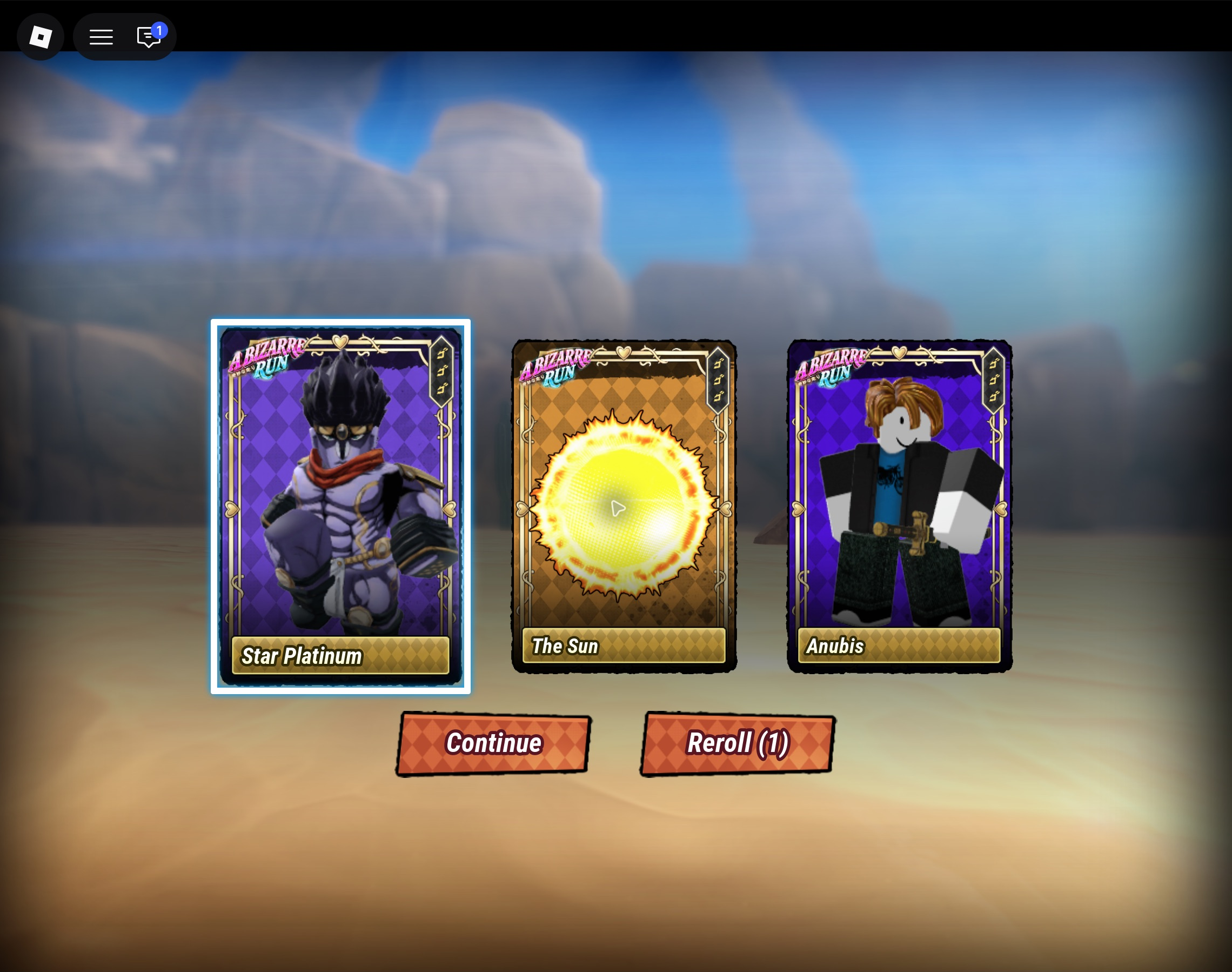
Because all three card backs are identical before you click, your initial pick is made blind. Selecting one of the hidden cards flips all three cards so you can see the Stand assigned to your chosen spot alongside the two other cards, accompanied by Continue and Reroll (1) buttons.
Choosing Continue keeps the Stand from your selected card and moves you into tutorial play, where pressing B summons your Stand so you can test its moveset. If you are considering the Reroll (1) button on this tutorial screen, read any on-screen prompt carefully before deciding, and treat that initial tutorial option separately from later Stand Arrow and Rokakaka Fruit preparation.
- Load into the opening tutorial until the "Pick a card to get your first Stand!" screen appears with three face-down cards.
- Select one of the three hidden cards to reveal the Stand assigned to your pick along with the two other cards.
- Review your revealed Stand and choose Continue to keep that selection and enter tutorial play, or inspect the Reroll (1) prompt before deciding whether to use the initial tutorial reroll.
- Press B once you are in control of your character to summon your Stand and confirm its combat moves load on screen.
How to Obtain and Craft a Stand Arrow
Use a Stand Arrow to obtain a Stand in A Bizarre Run. You can craft an Arrow from five Arrow Fragments, roll one through lobby item spins, or receive a full Arrow as a very rare race-win reward. Fragment crafting gives you a five-fragment target to track toward your next Arrow.
Keep item spins separate from combat abilities when reading the menus. Lobby spin rolls that award items are distinct from the Spin Spec, which is a fighting style unlocked through Gyro's questline rather than drawn from an Arrow. Once you have gathered five Arrow Fragments, move to the crafting interface to assemble the full item before attempting a draw.
While working toward the five Arrow Fragments needed for crafting, community guides note that fragments can spawn across the map and can also appear as a Spin Wheel reward. Watch the ground along your route while traveling through the map or race stages to pick up any visible fragments, and check your post-race results screen to see if your finish awarded a Spin Ticket (for example, published Stage 1 result screenshots show a 12th-place finish granting one Spin Ticket). Whenever you receive a Spin Ticket, open the lobby Spin Wheel and inspect its current prize pool to see whether Arrow Fragments or full Stand Arrows are listed before spinning.
- Open the Stands menu in the lobby and navigate to its Craft section.
- Inspect the Stand Arrow recipe and verify that your inventory holds all 5 required Arrow Fragments.
- Combine the 5 Arrow Fragments using the crafting prompt if that matches the displayed recipe.
- Check your inventory or Craft list to confirm the completed Stand Arrow is present before you try to use it.
Using the Stand Arrow
Once you are past the opening tutorial, acquiring another Stand or replacing one you cleared uses a Stand Arrow from your inventory rather than the initial tutorial prompt. Community documentation notes that players have a free second Stand slot and that using a Stand Arrow requires an empty active slot, so check the Stands menu first to see whether you can roll directly into an open slot or need to clear an equipped Stand with a Rokakaka Fruit before using an Arrow.
Using a Stand Arrow grants a random Stand. Before using one, settle in the lobby with an eligible empty active slot and check the choices on the current draw screen. After accepting your roll, summon the Stand with B and check your skill bar and Stands menu to see which kit filled the slot.
Changing Stands, Checking Slots, and Using Rokakaka Fruit
How you draw another Stand depends on whether you are filling an open slot or clearing an occupied one. Public guides note that the Stands menu can include two free slots, while the wiki states that consuming a Rokakaka Fruit in the lobby removes your currently equipped Stand so another Stand Arrow can be used. Rokakaka Fruits are documented as spawning on trees in Stage 1 and Stage 2 of races and being sold by the Merchant for 7,000 cash if you do not already have one from a stage pickup or code.
Because a Rokakaka Fruit only removes your active Stand and does not grant a new one, always prepare your replacement Stand Arrow or five Arrow Fragments before clearing a slot. Rather than assuming a new Arrow can overwrite a Stand without risk or that switching slots preserves everything automatically, let the live Stand menu and confirmation prompts guide your next step.
- Verify that you already have a replacement Stand Arrow (or 5 Arrow Fragments ready to craft) in your inventory before changing your setup.
- Open the Stands menu in the lobby and inspect your available slots and the name of your currently equipped Stand.
- If the interface shows an empty slot that lets you roll a new Stand while keeping your existing kit, follow that menu route and read any on-screen prompt carefully instead of using a Rokakaka Fruit.
- If you need to replace an unwanted Stand in an occupied slot, make sure that specific Stand is the one currently equipped, then open Stands -> Craft, select the Rokakaka Fruit, and choose Use.
- Read the removal prompt carefully before accepting to verify that the unwanted Stand is the one currently equipped and to check what the reset affects; if the target Stand or slot effect is unclear, do not confirm the use of the Rokakaka Fruit.
- After confirming removal in the lobby, check the slot to see that the old Stand is cleared, then use your prepared Stand Arrow, pick one of the three face-down cards to reveal your new Stand, and confirm the revealed Stand loads into your active bar.
Documented Stand Candidates and When to Stop Rerolling
When you check which Stand you rolled, keep in mind that community guides and in-game displays often use either musical names or character names for the exact same kit. While the live game runs under the [STAGE 3] A Bizarre Run title, seeing a Stand in a broader gallery or reference list does not guarantee that every listed entry is in the standard Stand Arrow draw pool. Combat teaching routes are also separate from Arrow draws: Spin is documented as earned through Gyro's Basic Mastery and Desert Hazards and Combat quests, replacing your revolver with a Steel Ball rather than coming from a Stand Arrow. The overview and candidate kits below highlight distinct gameplay roles to help you evaluate what you roll, rather than listing a complete current Arrow pool.
Because you cannot see the Stand names before picking a card during the opening tutorial, your practical decision happens after the reveal: evaluate how the Stand you drew supports your preferred approach to races or Battlegrounds fights, and decide whether to keep practicing with it or gather supplies for a future reset. Mobility and ranged tools like Sandman or Tusk Act 1 help with positioning and pressure across race stages, while close-range kits like Star Platinum or Anubis suit direct skirmishes. Conserving a workable Stand keeps you equipped while you collect replacement fragments or fruits, so hold onto a usable draw until you have both a Rokakaka Fruit and another Stand Arrow ready for a future roll.
- Star Platinum: Close-range combat and utility Stand.
- Tusk Act 1: Ranged projectile Stand.
- Anubis: Sword-based melee combat Stand.
- Sandman / In a Silent Way: One mobility-focused Stand kit referred to by either name.
- Oyecomova / Boku no Rhythm wo Kiitekure: One explosive-trap Stand kit referred to by either name.
- Mr. President / Coco Jumbo: One utility room Stand kit referred to by either name.
- The Sun: Ranged area-pressure Stand.
- Dirty Deeds Done Dirt Cheap (D4C): Clone and dimension utility Stand.
Horse Trait Rerolls vs. Stand Rerolls
While A Bizarre Run includes localization labels for Horse Trait Reroll and Horse Passive Reroll, those terms refer to horse customization rather than your character's Stand combat kit, so do not use the Stand Arrow and Rokakaka Fruit instructions in this guide as an assumed method for rerolling horse traits or passives.
Sources and further reading
- A Bizarre Run on Roblox (By Current.)
- Stand Arrow - A Bizarre Run Wiki
- Arrow Fragment - A Bizarre Run Wiki
- Rokakaka Fruit - A Bizarre Run Wiki
- Stands & Specs - A Bizarre Run Wiki
- Spin - A Bizarre Run Wiki
- Tusk Act 1 - A Bizarre Run Wiki
- Update Log - A Bizarre Run Wiki
- A Bizarre Run Stands Guide - Blox Informer
- A Bizarre Run Stand Tier List - Pro Game Guides
- How to Remove Stands in A Bizarre Run - RobloxDen
- A Bizarre Run Stand Arrows Guide - Bloxodes
- How to Play A Bizarre Run on Roblox - All Things How
- AllThingsHow: A Bizarre Run Stands and Crafting (November 14)